Draft iconeden represents quality and beautiful collections of icons for applications, Web sites, user interfaces. In addition to its direct responsibilities, and development, the authors have published on your site a few sets of free icons, as well as writing books on the subject. In general, the guys doing what brings them pleasure, and that they are well produced. Judge for yourself, I suggest to download beautiful icons for your needs.
The set contains 131 icons in green color, which gladden the eye and pleasant to look at the light and dark background. Various images from the collection have already been published separately in the blog of one of the authors, are now gathered together to make it convenient and easy to download all at once.
Download here
Bright
iconeden are pleased to present a set of «bright» icons containing 148 clear, well-developed vector images. They are intended for wide use in applications, multimedia and software. You can use both for personal or commercial projects.
Download here
Immediately you can see that from iconeden guys know their business and professionals. If you want to buy a ready-set, or the development of a new book:)
For the same action or object can be drawn quite different icons. You can vary all: style, color, perspective and even metaphor. In my view, the latter - the most valuable in the design icons - concentrated meaning. But if the metaphor of the original, and with humor, it is not an icon, but a real jewel! I invite your attention to my personal selection of icons based on the unusual and striking metaphor.
#1 Windows 3.11
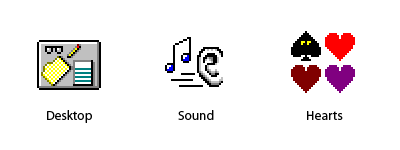
Let's start with a distant 93 years, when Windows 3.11, which was one of the most beautiful interfaces in the history of the operating system. You can see that the designers have worked with great love and diligence. They paid much attention to details and nuances. Windows 3.11
Desktop - Once is not drawing the desktop in different operating systems! In my opinion, this is the most fun and exciting. But these reflections on the glasses!
Sound - In ikonochnom fact very often used the image of hands. And the ears - are rare.
Hearts - How sweet: peaks with eyes! We do not do that.
#2 OS/2 Warp 4
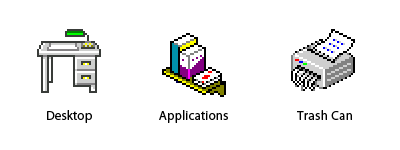
In OS / 2 Warp 4 issues of 1996 appear three-dimensional icons, which are gradually being included in vogue. But the framework is still the same - pixel icons in 16-color palette.
Desktop - Green Lamp subdued my heart. But in general, once made a desktop icon psevdotrehmernoy, the desktop itself and it was necessary to do so. :)
Applications - A folder with attachments - a very complicated icon and obscheupotrebimoy metaphor for it is not thought of until now. Designers interface OS / 2, agreed that the shelf with a box / book and a deck of cards - what you need!
Trash Can - Attentive readers will recall, as I cursed this icon in the article «10 errors in the design icons». But the metaphor is indeed unusual, and very likeable Schroeder.
#3 BeOS R5
When there is a new generation of multimedia OS, many had pinned great hopes on it. In the end, however, failed, but it is not important. So, in 2000, went BeOS R5, which has been decorated with one of the most unusual images. BeOS R5
Desktop - again a green light! With such a solid and realistic «table» interface might have to do is fully three-dimensional!
Browser - The term «web surfing» prizhilos, but the icon with a metaphor and remained exotic. A pity!
File Manager - They like to say to us: «It helps to search for files!» Very funny metaphor. The truth is, I would not like the dog-manager navodil order in my documents - dogs are rarely successful.
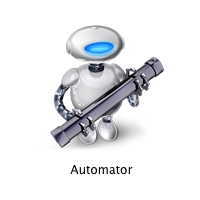
Program Automator allows you to create scripts to automatically run it. For the first time, this assistant appeared in Mac OS X Tiger. Rare stroke of luck, if on the icon you can understand what makes the program. Compare with other okoloskriptovymi programs - scrolls and buttons with strelochkami. (phew!)
#5 VLC Media Player
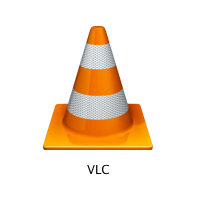
Prior to that, we looked at «home» icons operating systems. This video player is not part of the operating system, but taking into account the prevalence of VLC Media Player, it can also be regarded as «standard».
According to the icon is very difficult to guess what makes the program. But a metaphor for something unusual! I tried to find out why VLC developers chose it on a road cone. History is quite strange. It turned out that the developers (students École Centrale Paris) is a collection of cones. In honor of this, and an icon.
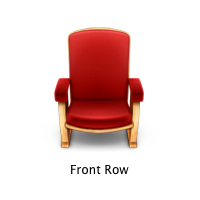
#6 Mac OS X Front Row
Front Row native media player of the Mac OS X in the style of Apple TV. This is not even today, and the future. Also interesting case. Why a chair? According to the icon was not clear what makes the program, but it reflects the essence of the process: «Usazhivaysya sit back and watch the movie!» In general, icons of different media players, the problem with a single metaphor. I do not think that in the near future to change it.
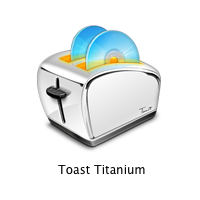
#7 Roxio Toast
Roxio Toast - in fact, the standard program for wrighting CD under Mac OS X. Fortunately, unlike in this toaster, disks are not burn!
One of the most brilliant metaphors in the history of ikonkostroeniya. Toaster is much more understandable and appropriate metaphor than the standard icon of radiation. At kartike represented by an icon Roxio Toast 7, the appearance tostera changed from version to version.
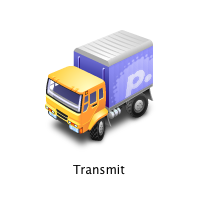
#8 Transmit
Transmit - ftp-client for Mac OS X. The icon reminds me of gikovskoy problem: «truck from point A to point B transported five tons of dvd-ROM drive. What will be in this case, the data transmission rate? »
This program is a widget, if you drag a file on him, then he has his «otvozit» on the imaginary road in the pre-specified location. So cute!
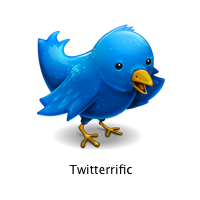
#9 Twitterrific
Twitterrific - Client program for regular classes mikroblogginogom through Twitter.
I have little in birds, but let me suggest that the icon is drawn sparrow. The point is that in English «tweet» means «chirm» or «chirp». Here is a bird and chirikaet. So simple, but original.
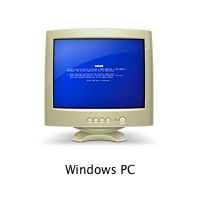
# 10 icon computer with Windows in a networked environment, Mac OS X
If you use a poppy, but there is a network PC - you can share files and printers to share. This is good news. But there is a nuance. Windows PC
That's what the icon looks like a computer with Windows in a networked environment, poppy. Designers Гусары Apple poshutili thin, but a bit raw.
At the same time, I finish my review. I do not like, but I turned off in the direction of programs for Mac OS X. Unfortunately, I did not find any interesting icons in Windows Vista. Plus, I deleted the little-known icons of programs. I would be very grateful if you send me (or write in comments) Other examples of icons with unusual metaphors.
Criticize someone else's work is always much easier than to create something very cool. But if systematic approach to criticism, make a numbered list, prepare illustrations, it would be a whole analysis already! In my view, the design of icons now in the transition period. Permission is becoming more and more screens, and consequently increasing icons. But still relevant icons size 16 x16 and even less. So, these are the main errors in the design icons… 1. The lack of visibility icons
Sometimes within one set appear too similar to each other icons and it is very difficult to understand "that there is". If you do not read the signature, it can be very easy to get wrong and confusion icons. 2. Too many elements in a single icon
What icon simpler and more concise, so much the better. It is desirable that the number of objects in a single icon, it would be minimal.
But the designers of Microsoft, inspired by the new format of icons in Windows Vista operating system, and decided not melochitsya "painted on all the money": 3. The extra elements
The icon should be read as "easy". The fewer items on it, the better. Preferably, the whole image was important, not just part of it. Therefore, it is necessary to pay attention to the context in which icons will be used.
Take, for example, a set of icons to work with a database: But if the application (or in a separate tulbare) all actions occur only with the database, then we can (and should) remove neznachimuyu part: 4. Net stylistic unity set
It is the general style combines multiple icons in the set. Unifying factors can be: colours, the prospect of size, technology, or a combination of drawing these properties. Designer can keep these rules in mind, if a little icons in the set. If the icons, and many of them operate different designers (such as icons for the operating system), set up special instructions. These instructions describe in detail how to paint icons to fit it in a harmonious set. 5. The unnecessary perspective and shadow in the small icons
Progress is moving: interfaces in the ability to perform semitransparence missing restrictions on the number of colors, plus a fashion for Three. No matter whether it is not beneficial? Not always! Especially when it comes to icons size 16 × 16 and less.
6. Too original metaphors
The selection of what will be depicted on the icon - always compromises between recognition and originality. Before you think of a metaphor for icons, it is desirable to see how it is done in other products. Perhaps the best solution is not to invent something original, but how do everywhere.
An example of such excessive originality can be a basket icon in OS / 2 Warp 4, which does not trash, and memory.
7. National and social characteristics
Must always be aware of who and what conditions will enjoy your thumbnail. An important aspect of a national characteristics. Cultural attitudes surrounding objects, gestures - all of this can be very very different in another country. The answer can be found in the guide to the creation of icons for Mac OS X: Use universal and easily recognizable image. Not fokusiruytes on secondary aspects of the elements. Example: icons for e-mail would be preferable to use the image stamp than trudnouznavaemogo mailbox. 8. Using images in real interface elements icons
Guide to the creation of icons for Mac OS X warns us: Do not use real elements of the interface icons. But all in vain!
9. Text inside icons
This error usually happens in the application icons. Indeed, the first that comes to mind - to make application icon of the logo application. What bad text inside icons? First, it rigidly tied to the language and localization difficult. Secondly, if the icon is fine, the text impossible to read. And thirdly, in the case of application icons, the text is duplicated in the form of the application name.
10. Not hit pixels
Typically, this problem comes up when paint icons in the vector editor. A large amount of it looks nice and clear. But in reality, icons and small cracks in the anti-aliasing "blurred the boundaries" of objects.